In AR Collect vs Biller Genie, choose AR Collect if you run QuickBooks Desktop Pro, Premier or Enterprise and want reminders and statements on a flat price, from $39.95 a month on QuickBooks Online and $49.95 on Desktop. Choose Biller Genie if you want invoicing, card and ACH payments and a late fee in one tool.
Biller Genie reaches Desktop through a separate connector and was last reported at $49.95 a month plus 0.50% of every invoice it collects; it now hides its prices, so request a quote.
Neither tool prices mainly by user, so compare them per open invoice. AR Collect is fixed inside a band of open invoices, and Biller Genie's last reported price rises with every dollar it collects.
A US small business waited 29.7 days to be paid and settled 8.6 days past due, on Xero's latest US small business data, against 25.6 days in California.
The 8.6-day average decides whether the one late fee on this page is worth having.
What QuickBooks AR software is (and what it is not)
QuickBooks AR software reads the open invoices out of QuickBooks Online, QuickBooks Desktop or Xero and works them until they are paid. Both tools on this page sit beside the ledger: they pull the open invoices across, send the chasing and take the payment online.
- Scheduled reminders before and after the due date, by customer group on AR Collect and on one account-wide cadence on Biller Genie.
- Statements, which AR Collect sends daily, weekly or monthly with the invoice PDFs attached.
- A payment page for card and ACH, with surcharging on both tools.
- A late fee, on Biller Genie only, which cannot fire before 30 days past due.
- A payment plan the customer requests on Biller Genie, or a promise-to-pay record on AR Collect.
It is not the ledger. QuickBooks or Xero stays the record of every invoice and payment, and the tool reads the open invoices from it.
It is not a debt collection agency, and it is not invoice finance. On both tools the receivable and the credit risk stay with you. A finance provider settles the invoice in full and carries the risk itself, which is a different purchase.
AR Collect's pricing page now lists Sage among its included integrations, though no Sage marketplace listing was found. Neither tool lists NetSuite or Dynamics 365, so the category as this page uses it covers QuickBooks and Xero businesses. Biller Genie also reaches AccountingSuite.
How do AR Collect and Biller Genie compare side by side?
Two rows carry the decision: how each tool bills, and whether a late fee exists at all. The rest of the table describes how much product sits behind each price.
 |
 |
|
|---|---|---|
| Best for | QuickBooks Desktop businesses wanting flat-price reminders and statements | US small businesses wanting invoicing, payments and a late fee together |
| Revenue fit | Not published; the price band is set by open-invoice count | Not published; the bill scales with the value collected |
| Billing model | Flat monthly price by open-invoice band, no percentage | Last reported: monthly fee plus 0.50% of invoices collected, and current prices are hidden and must be requested |
| From (monthly) | $39.95 ($49.95 on QuickBooks Desktop) | $49.95 plus 0.50% of invoices collected (last reported; now hidden, request a quote) |
| Ledger integrations | QuickBooks Online, QuickBooks Desktop Pro, Premier and Enterprise, Xero, Sage (listed on its pricing page) | QuickBooks Online, QuickBooks Desktop, Xero, AccountingSuite |
| Late fee grain | Not listed | Yes (one account-wide schedule, add-on, switched on or off per customer); nothing is late until 30 days past due |
| Reminder grain | Yes (per customer group) | Yes (one global cadence per account) |
| SMS | Pricing page lists no SMS; Terms mention SMS (last seen) | None found |
| Statements | Yes (daily, weekly or monthly, with invoice PDFs attached) | Yes (as a reminder type) |
| Payment plans | No (promise to pay only) | Yes (the customer requests, the merchant approves) |
| Payments | Yes (card and ACH, with surcharging and no card fee added by the vendor) | Yes (card and ACH through its own merchant services or a connected gateway, with surcharging and dual pricing) |
| Rated | 4.0 from 2 on G2, 5.0 from 1 on Capterra, 2 on Trustpilot (April 2026), no Xero App Store reviews yet | 4.8 from 27 on Capterra, 3.0 from 4 on G2, 2.33 from 3 on the Xero App Store |
A footnote on three phrases used strictly above. Where a vendor prints no figure, the cell reads “Not published”. Where the vendor’s own materials do not confirm a capability, it reads “Not documented”. Where nothing in those materials points either way, it reads “None found”, which is a statement about the evidence rather than about the product.
What does AR software for QuickBooks Desktop have to do?
A Desktop file works differently from a cloud ledger, and that changes what a receivables tool has to be capable of, which is why the shortlist for a Desktop business is so short.
QuickBooks Desktop keeps its data in a company file on a machine you control, in a format that changes between editions and between years.
A tool that connects has to talk to that file rather than to a hosted API, and it has to keep talking to it when the business moves from Pro to Premier, or from a 2021 file to a 2024 one. Most of the receivables category solved that problem by not supporting Desktop at all.
A Desktop business needs these basics. Open invoices have to come out of the file reliably. Reminders have to go out on a schedule without anybody opening QuickBooks that morning.
Statements have to carry the invoice PDFs, because a Desktop customer usually has nowhere to log in and look. A payment taken online has to come back and close the invoice in the file rather than sit in a report waiting to be keyed.
The part most Desktop businesses go without is the charge. QuickBooks Desktop can assess a finance charge, but somebody has to run it, and running it every month against the accounts that deserve it is exactly the task that slips.
Only one of the two tools here raises the charge for you, and it will not do it before day 30.
AR Collect's pricing page lists Sage; neither tool lists NetSuite or Dynamics 365, so this is a comparison inside the QuickBooks and Xero world rather than a shortlist for the whole category.
AR Collect vs Biller Genie: price, ledgers and late fees (1:49)
AR Collect
AR Collect fits QuickBooks Desktop and QuickBooks Online businesses that want low-cost reminders on a flat price, from $39.95 a month
What is AR Collect best for?
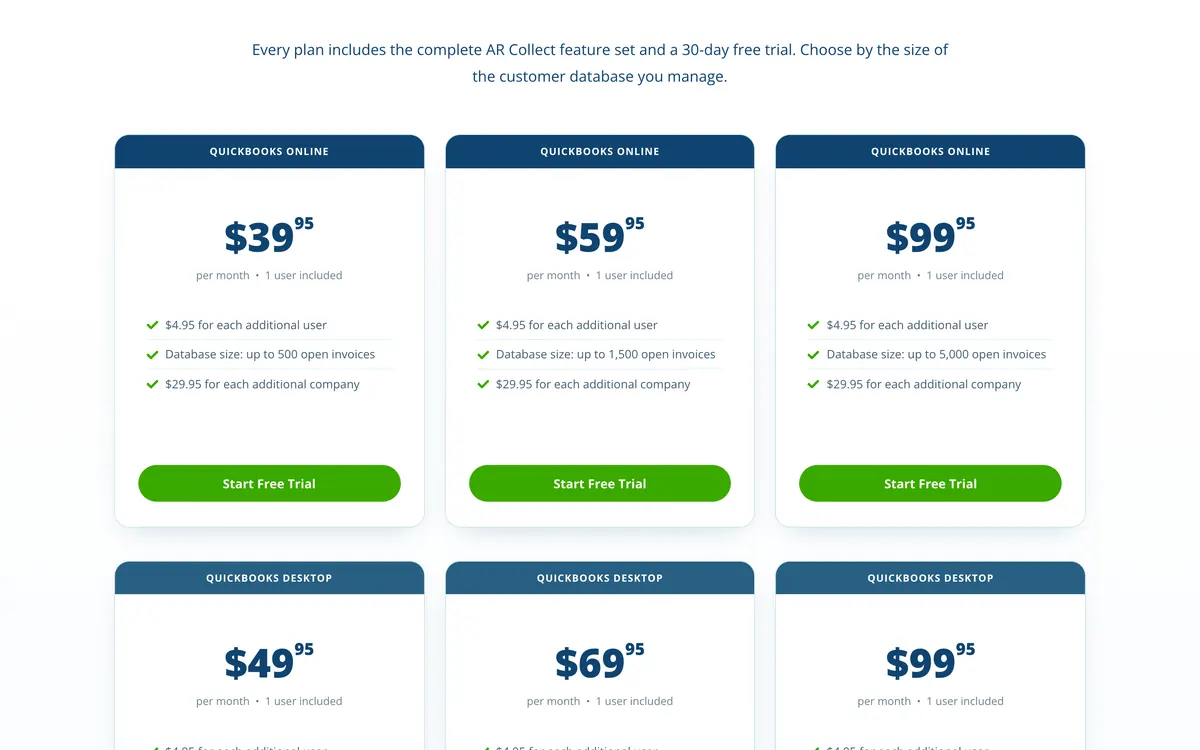
Choose AR Collect if you run QuickBooks Desktop Pro, Premier or Enterprise and want scheduled reminders, statements with the invoices attached, and a pay-now page, at $49.95 a month for up to 500 open invoices on Desktop or $39.95 on QuickBooks Online.
- Fits
- Small businesses on QuickBooks Desktop, QuickBooks Online or Xero. No revenue band is published; the price band is set by how many invoices are open, starting at 500
- Regions
- United States. The vendor publishes no company details, and support is answered on a New York area number. The Xero App Store listing was added in April 2025
- Entry cost
- $39.95/mo for up to 500 open invoices, $59.95/mo for up to 1,500 and $99.95/mo for up to 5,000 on QuickBooks Online; $49.95, $69.95 and $99.95 on QuickBooks Desktop; $199.95/mo for up to 10,000 on the Massive Database plan covering both. Xero is $39.95/mo for unlimited invoices on the vendor site. Each plan includes one user. Extra users are $4.95/mo and extra companies $29.95 on QuickBooks Online or $35.95 on QuickBooks Desktop. Annual billing is offered at a discount with no figure published. A 30-day trial runs with no card.
- Rated
- 4.0 from 2 reviews on G2, both February 2022; 5.0 from 1 review on Capterra, December 2022; 2 reviews on Trustpilot, posted 8 and 23 April 2026; no reviews yet on its Xero App Store listing
- Awards
- None found
- Runs on
- QuickBooks Online, QuickBooks Desktop Pro, Premier and Enterprise through the Web Connector, Xero, Sage (listed on its pricing page)
- Late fees and interest
- Not listed. Late fees and interest are not mentioned anywhere in the vendor's materials
- Main strength
- QuickBooks Desktop coverage for Pro, Premier and Enterprise, which almost nothing else in the category reaches
The reach into QuickBooks Desktop is why AR Collect is on this page at all. It connects to QuickBooks Desktop Pro, Premier and Enterprise through the Web Connector, which very little else in the category does, and it does it at $49.95 a month for up to 500 open invoices.
The product itself is deliberately narrow. Open invoices come across from the file, customers sit in groups, and each group is tied to a template series and a schedule that sends advance notices before the due date and past-due notices after it.
A bulk smart email goes to every past-due customer behind a filter, and replies are tracked back against the customer record.
Statements run daily, weekly or monthly with the invoice PDFs attached, which counts for more on Desktop than on a cloud ledger because the customer has nowhere to log in and check. Card and ACH payments run through the portal with a surcharging option, and the vendor adds no card fee of its own on any gateway.
There is no installment plan. What there is instead is a promise to pay: an amount and a date recorded against the customer, listed in a commitment report over any date range, flagged in an exception report when the date passes unpaid, quoted back inside the reminder email, and fed into the cash flow forecast.
Limitations with AR Collect. Late fees and interest are not listed, its pricing page lists no SMS (its Terms mention SMS, last seen), there is no installment plan beyond the promise-to-pay record, and no AI is listed in the product. Five public reviews exist in total: three from 2022 and two on Trustpilot posted in April 2026, so there is little evidence of how it performs at volume.
The vendor publishes no company details at all, and support answers on a New York area number. Pricing is published up to 10,000 open invoices, and every extra user and every extra company file is charged on top. For AR Collect set against a tool that raises late fees and interest, see AR Collect compared on late fees.
Best suited for: Small businesses on QuickBooks Desktop Pro, Premier or Enterprise that want scheduled reminders and statements on a flat monthly price. It lists no late fees or interest, and only five public reviews exist to show how it performs at volume.
Biller Genie
Biller Genie fits US small businesses that want invoicing, reminders and card and ACH collection in one tool, last reported at $49.95 a month plus 0.50% of invoices collected
What is Biller Genie best for?
Choose Biller Genie if you are a US small business on QuickBooks or Xero that wants the invoice raised, chased and paid inside one tool, and can carry a percentage of what it collects to get it.
- Fits
- US small businesses on QuickBooks Online, QuickBooks Desktop, Xero or AccountingSuite with steady card and ACH volume. No revenue band is published; the bill scales with the value collected
- Regions
- United States. Founded 2019 with the software launched in 2020, head office in Orlando and an engineering office in Belfast
- Entry cost
- Last reported by third-party listings at $49.95/mo plus 0.50% of invoices collected; its pricing page states no long-term contracts and it now hides its prices, request a quote. The same listings last reported ACH as an add-on at $0.50 a transaction with a $20 monthly minimum and a $25 setup fee, and paper mail at $1.50 a reminder plus $0.25 an extra page. Check current pricing with the vendor.
- Rated
- 4.8 from 27 reviews on Capterra, latest June 2025; 3.0 from 4 on G2; 2.33 from 3 on its Xero App Store listing, where one 1-star review says "Working with Biller Genie has been a headache"
- Awards
- Inc. 5000 number 259, 2024
- Runs on
- QuickBooks Online through a two-way sync, QuickBooks Desktop through a separate connector, Xero, AccountingSuite, and named gateways including USAePay, Maverick, Sola, Authorize.Net, Elavon and PayPal
- Late fees and interest
- Yes, through a Late Fee Manager add-on. An invoice is not treated as late until it is 30 days past due, then charges recur on a 30-day schedule and post to a finance charge account. No interest calculation is documented; the schedule is account-wide, with a per-customer switch to charge or waive the fee
- Main strength
- Surcharging and dual pricing with their own checkout flows, with the fee reconciled back to the ledger automatically
Biller Genie does more than AR Collect: it adds invoicing, a larger payment stack and a late fee.
It raises and delivers the invoice from the accounting file, runs six reminder types up to and including a warning about an upcoming late fee, posts paper mail as an option, and takes card and ACH payments through a branded portal with autopay, per-customer thresholds and bulk invoice grouping.
The payment stack is where the depth is: named gateways including USAePay, Maverick, Sola, Authorize.Net, Elavon and PayPal, surcharging and dual pricing with dedicated checkout flows and the fee reconciled back to the ledger automatically, a virtual terminal and check capture. Payments are the business Biller Genie is actually in.
Its QuickBooks Desktop route is a separate connector rather than part of the two-way QuickBooks Online sync, which is worth pressing on in a demo if Desktop is the file you run. The Online integration is the one the product is designed around.
Biller Genie pushes its own merchant services, but its site and docs say you can connect your own gateway, and they list USAePay, Maverick, Sola, Authorize.Net, Elavon and PayPal. A business with a processor it already likes should confirm its gateway is supported before the demo ends.
Limitations with Biller Genie. The percentage is charged on money collected rather than on work done, so the bill grows with a good month.
Reminder timing is set once for the whole account and cannot be varied for a specific customer. There is no SMS channel at all, and paper mail is charged per item. The late fee will not fire until an invoice is 30 days past due, and no interest calculation is documented behind it.
Biller Genie pushes its own merchant services, though its site and docs say you can connect your own gateway. The G2 and Xero App Store scores sit well below the Capterra one, and two of the three Xero App Store reviews give 1 star.
Best suited for: US small businesses on QuickBooks or Xero that want invoicing, reminders and card and ACH collection in one tool. On its last reported pricing the 0.50% of invoices collected grows the bill with every good month.
What does each tool cost per open invoice at 100, 500 and 1,500 invoices?
Neither vendor prices mainly per user, so the useful unit is the open invoice. Priced that way, the gap between the two is a multiple rather than a percentage.
| Open invoices | Average invoice | Collected that month | AR Collect | Biller Genie | Cost per open invoice |
|---|---|---|---|---|---|
| 100 | $500 | $50,000 | $39.95 | $299.95 | $0.40 against $3.00 |
| 100 | $2,000 | $200,000 | $39.95 | $1,049.95 | $0.40 against $10.50 |
| 100 | $10,000 | $1,000,000 | $39.95 | $5,049.95 | $0.40 against $50.50 |
| 500 | $500 | $250,000 | $39.95 | $1,299.95 | $0.08 against $2.60 |
| 500 | $2,000 | $1,000,000 | $39.95 | $5,049.95 | $0.08 against $10.10 |
| 500 | $10,000 | $5,000,000 | $39.95 | $25,049.95 | $0.08 against $50.10 |
| 1,500 | $500 | $750,000 | $59.95 | $3,799.95 | $0.04 against $2.53 |
| 1,500 | $2,000 | $3,000,000 | $59.95 | $15,049.95 | $0.04 against $10.03 |
| 1,500 | $10,000 | $15,000,000 | $59.95 | $75,049.95 | $0.04 against $50.03 |
The model assumes the open invoices turn over once inside the month, so the collected value is the invoice count multiplied by the average invoice. AR Collect is $39.95 up to 500 open invoices and $59.95 up to 1,500 on QuickBooks Online ($49.95 and $69.95 on Desktop).
Biller Genie is shown at its last reported price, $49.95 plus 0.50% of the value collected, with no cap applied; Biller Genie now hides its prices, so request a quote.
Card processing sits outside both columns, as do Biller Genie’s last reported $25 ACH setup fee, $20 ACH monthly minimum, $0.50 an ACH transaction and $1.50 a paper reminder plus $0.25 an extra page, and AR Collect’s $4.95 extra user and $29.95 or $35.95 extra company file. Check current pricing with the vendor before you rely on these figures.
Change the two inputs below to match your own ledger.
On $80,000 collected in a month with 900 open invoices, Biller Genie costs $449.95 that month and AR Collect costs $59.95, so AR Collect is $390.00 a month cheaper, or $4,680.00 a year.
Biller Genie’s last reported price is $49.95 plus 0.50% of the value collected, with no cap applied; it now hides its prices, so request a quote.
AR Collect is $39.95 up to 500 open invoices, $59.95 up to 1,500, $99.95 up to 5,000 and $199.95 up to 10,000 on QuickBooks Online, and publishes no price above that. Card processing costs sit outside both figures.
The two columns behave differently because only one of them is a software price. AR Collect charges for a band of invoices, so it is flat until the band changes and then flat again.
Biller Genie charges for money moved, so it behaves like a merchant fee, and a business with a small number of large invoices ends up paying the most per invoice of anybody on this page.
Card processing is the line neither column shows, and the one most likely to change the answer. AR Collect charges nothing on top of whichever gateway you already run, so your existing rates carry over untouched. Biller Genie pushes its own merchant services, so ask for its rates, and ask what changes if you keep your current gateway.
Which QuickBooks editions and years does each tool reach?
QuickBooks edition coverage removes one of the two tools for many businesses, so this section states it precisely.
AR Collect connects to QuickBooks Online and, through the QuickBooks Web Connector, to QuickBooks Desktop Pro, Premier and Enterprise, the three editions its Terms name. Its current site does not list supported years, and Desktop has its own price ladder: $49.95, $69.95 and $99.95 by open-invoice band.
Biller Genie connects to QuickBooks Online through a two-way sync built on webhooks with a scheduled background job behind it, and reaches QuickBooks Desktop through a separate connector. The Online integration is the one the product is built around, and the Desktop one is the one to ask about.
Both also connect to Xero. Biller Genie’s US Xero App Store listing carries three reviews at 2.33; AR Collect’s listing, added in April 2025, has none yet. Biller Genie adds AccountingSuite, which nothing else here reaches.
AR Collect's pricing page now lists Sage among its included integrations, though no Sage marketplace listing was found. For NetSuite, Sage Intacct or Dynamics 365, neither tool is the answer.
The order to work in for a Desktop business: confirm the edition and the year in writing, confirm what happens to the connection when the file is upgraded, and confirm whether the Desktop connector is included in the price or sold separately.
Why does the 30-day fee floor matter against an 8.6-day average?
Only one of these two raises a late fee, and the question worth asking is when it is allowed to fire.
Biller Genie’s Late Fee Manager is an add-on, switched on for the whole account. The merchant sets the terms shown to the customer, a per-customer switch can stop or waive the fee, and the charge posts to a finance charge account in the ledger.
Nothing is treated as late until it is 30 days past due, and from that point the charge recurs every 30 days and stacks.
Set that against the figure at the top of this page. The average US invoice settles 8.6 days past due. A fee that cannot fire before day 30 has already missed most of the invoices a small business would describe as late, and it lands only on the accounts that were heading for trouble anyway.
Whether that matters depends on what you wanted the fee to do. As a recovery instrument aimed at a handful of stubborn accounts, day 30 is a reasonable place to start. As a behavioral lever that teaches a customer to pay on time, day 30 teaches nothing, because the customer who pays at day 8 never sees it.
In the United States a late fee is a term of your contract rather than a statutory entitlement, so the rate and the trigger are yours to set within what state law allows, and neither tool constrains you in law.
What Biller Genie constrains is the grain: one schedule for the whole account, first charge at day 30, no interest calculation documented behind it, and only an on or off switch per customer. AR Collect raises nothing at all, so on that side the charge is added manually in QuickBooks or not at all.
- Biller Genie
- A recurring fee every 30 days with no interest calculation documented. One schedule for the whole account, first charge at 30 days past due, then every 30 days. Flat-versus-percentage handling is not documented, and the only per-customer control is an on or off switch.
- AR Collect
- Not listed. Late fees and interest do not appear anywhere in the vendor's materials, so any charge has to be raised manually in QuickBooks.
Does either tool offer a promise to pay or an installment plan?
Neither tool builds a schedule for you the way a dedicated payment plan product would, and the two substitutes behave differently on the day the money is due.
A Biller Genie plan starts with the customer. They request installments through the portal, the merchant approves or rejects the request, and from then the money has dates against it and a saved method to run against them.
An AR Collect promise to pay starts with the same conversation and ends in a record rather than a schedule.
The amount and the date go against the customer, a commitment report lists every promise made across a chosen date range, an exception report shows the ones that passed unpaid, the promise is quoted back inside the reminder email, and the figure feeds the cash flow forecast.
The difference is who has to act on the date. Biller Genie takes the money. AR Collect tells you the money did not arrive, and somebody picks up the phone.
Neither is invoice finance. On both tools the receivable and the credit risk stay with you. A finance provider settles the invoice in full and carries the risk itself, which is a different purchase from either of these.
Which QuickBooks AR software fits your use case?
Find the row that matches your business. The answer turns on your QuickBooks edition, how much you collect in a month, and whether you want a late fee raised for you.
| Use case | Start with | Watch out |
|---|---|---|
| QuickBooks Desktop Pro, Premier or Enterprise | AR Collect | Supported Desktop years are not listed, so confirm yours in writing |
| Reminders and statements only, on a flat price | AR Collect | No late fees or interest listed; pricing page lists no SMS |
| A late fee raised for you | Biller Genie | Nothing is late until 30 days past due, and no interest calculation is documented |
| A few large invoices and a high value collected each month | AR Collect | Its flat band price does not move with invoice value; Biller Genie's last reported 0.50% does |
| An installment plan the customer can request | Biller Genie | AR Collect records a promise to pay only |
| NetSuite, Sage Intacct or Dynamics 365 | Neither tool | Neither lists these ledgers |
Common questions
Answers on cost per invoice, QuickBooks file coverage, late fees, Xero support and SMS for AR Collect and Biller Genie.
Which suits which business, AR Collect or Biller Genie?
Neither AR Collect nor Biller Genie is better outright, because each suits a different job. AR Collect is reminders, statements and a portal on a flat $39.95 a month, with no late fee at all.
Biller Genie adds invoicing, a card and ACH stack and a late fee, and it was last reported at $49.95 a month plus 0.50% of invoices collected, now hidden, request a quote.
Choose AR Collect if you run QuickBooks Desktop Pro, Premier or Enterprise and want scheduled reminders and statements on a flat monthly price. Choose Biller Genie if you want invoicing, card and ACH collection and a day-30 late fee in one tool and can carry 0.50% of what you collect.
Which one works with older QuickBooks Desktop versions?
AR Collect connects to QuickBooks Desktop Pro, Premier and Enterprise through the Web Connector; its current site does not list supported years. Biller Genie reaches Desktop through a separate connector rather than through the two-way QuickBooks Online sync it is built around. Confirm your exact edition and year with the vendor in writing before committing either way.
How much do AR Collect and Biller Genie cost?
AR Collect is $39.95 a month for up to 500 open invoices, $59.95 for up to 1,500, $99.95 for up to 5,000 and $199.95 for up to 10,000 on QuickBooks Online ($49.95, $69.95 and $99.95 on Desktop), plus $4.95 for each extra user and $29.95 or $35.95 for each extra company file.
Biller Genie was last reported by third-party listings at $49.95 a month plus 0.50% of invoices collected, with ACH and paper mail charged as add-ons; it now hides its prices, so request a quote.
What does each one cost per open invoice?
At 500 open invoices AR Collect works out at about $0.08 an invoice, whatever the invoices are worth, because its band price does not move with value.
Biller Genie at the same invoice count works out between about $2.60 and $50.10 an invoice depending on the average invoice value, because its percentage rises with the money collected.
Do AR Collect and Biller Genie apply late fees?
AR Collect does not list late fees: no late fee or interest function appears anywhere in its materials, so any charge is raised manually in QuickBooks. Biller Genie does, through a Late Fee Manager add-on that treats an invoice as late at 30 days past due and then charges every 30 days on one global rule.
Do AR Collect and Biller Genie work with Xero as well as QuickBooks?
AR Collect and Biller Genie both work with Xero as well as QuickBooks. AR Collect covers QuickBooks Online, QuickBooks Desktop Pro, Premier and Enterprise, and Xero. Biller Genie covers QuickBooks Online, QuickBooks Desktop through a separate connector, Xero and AccountingSuite. Confirm your exact ledger and edition before committing.
Does either tool send SMS reminders?
AR Collect's pricing page lists no SMS, and its Terms mention SMS (last seen). Biller Genie publishes no SMS channel. AR Collect lists email reminders. Biller Genie sends email and, as a paid add-on, paper mail.
Alternatives
Best Biller Genie alternatives
Five Biller Genie alternatives on enforcement, price and reviews.
By accounting system
Best AR automation for QuickBooks
The tools that pick up where QuickBooks Online stops, compared.
Late fees
How much can I charge in late fees?
What a late fee can legally be, and how to set the rate.
Buyer's guide
Best accounts receivable software
The pillar guide: pick by size and accounting system, with a recommendation matrix.
Sources
7 sources, checked by Julie Turnbridge on November 3, 2026
- Xero Small Business Insights xero.com/us/resources/small-business-insights
- Xero App Store apps.xero.com/us/app/ar-collect
- Xero App Store apps.xero.com/us/app/biller-genie
- G2 g2.com/products/arcollect/reviews
- Capterra capterra.com/p/233202/AR-Collect
- Capterra capterra.com/p/176347/Biller-Genie/reviews
- G2 g2.com/products/biller-genie